| 37 | Delete | Edit | 2/7/2024 9:45:24 PM | Wow, awesome blog format! How long have you been blogging for?
you made running a blog look easy. The full glance
of your website is great, let alone the content! You
can see similar: https://camilashop.top and here Camilashop.top |
| 39 | Delete | Edit | 2/23/2024 7:43:27 AM | Lets try this out.
this text should be bold.
www.somelink.com

|
| 40 | Delete | Edit | 3/2/2024 5:57:00 PM | Hi colleagues, how is all, and what you would like to say regarding this post, in my view its really amazing in favor of me.
I saw similar here: dobry sklep and also here: sklep online |
| 41 | Delete | Edit | 3/4/2024 7:10:36 AM | Barcelona & Tenerife
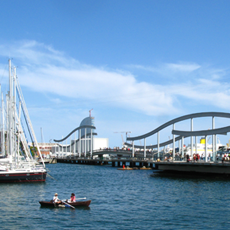
Barcelona is An excellent place to discover world-class arts and culture. The sights in Barcelona are second to none. Don’t miss the architectural wonder, Casa Mila - otherwise known as La Pedrera. You’ll want to see another one of Antoni Gaudi’s architectural masterpieces, Casa Batllo, which is located at the center of Barcelona.
Tenerife, one of the nearby Canary Islands, is the perfect escape once you’ve had your fill of the city. In Los Gigantes, life revolves around the marina. Take a boat out in search of bottlenose dolphins and whales. While you’re in Tenerife, visit Mount Teide. It’s the highest point in Spain and the third-largest volcano in the world.
Attractions
 IMAGE IMAGE
|
 LOCATION LOCATION
|
 DESCRIPTION DESCRIPTION
|
 VISIT VISIT
|
 |
Los Gigantes, Tenerife
|
Los Gigantes is located on the south-west coast of the Canary Island, Tenerife. It’s a cozy and tranquil resort town framed by a backdrop of magnificent cliffs. |
book a visit >> |
 |
Casa Mila, Barcelona |
Casa Mila, more commonly known as La Pedrera, is a quirky modernist apartment building designed by Antoni Gaudi in Barcelona, Spain. |
book a visit >> |
 |
Mount Teidet, Tenerife |
At 12,200 feet (3,718 meters) Mount Teide is the highest mountain in Spain and the third-largest volcano in the world. |
book a visit >> |
| Destinations |
Full Price Info |
Comments |
- Barcelona
- Tenerife
- Santa Cruz
- Teide
|
- $800 per person sharing
- $900 per single occupancy
- $700 per child
|
We enjoyed a marvelous stay at this location. Very warm welcome, extremely kind and helpful hostess. For sure, we'll come back! Samuel Elms, London.
|
|
|
| 42 | Delete | Edit | 3/4/2024 7:11:05 AM | ABcdEfgh |
| 43 | Delete | Edit | 3/14/2024 2:27:56 PM | Hey there! I've been following your web site for a long time now and
finally got the courage to go ahead and give you a shout out from Houston Texas!
Just wanted to tell you keep up the excellent work!
I saw similar here: Sklep internetowy |
| 44 | Delete | Edit | 3/14/2024 5:26:03 PM | Can you tell us more about this? I'd want to find out some additional information. I saw
similar here: Sklep internetowy |
| 45 | Delete | Edit | 3/18/2024 8:52:09 AM | ≥ or ≤ |
| 46 | Delete | Edit | 3/22/2024 7:49:07 AM | Hi, I read your new stuff daily. Your writing style is witty, keep
up the good work! I saw similar here: E-commerce |
| 47 | Delete | Edit | 3/28/2024 3:27:34 AM | Howdy! Do you know if they make any plugins to help with SEO?
I'm trying to get my blog to rank for some targeted keywords but I'm not seeing very good gains.
If you know of any please share. Thanks! You can read similar blog here: Sklep internetowy |
| 48 | Delete | Edit | 3/28/2024 5:17:11 PM | Howdy! Do you know if they make any plugins to assist with SEO?
I'm trying to get my blog to rank for some targeted keywords but I'm not seeing very good success.
If you know of any please share. Appreciate it!
You can read similar blog here: E-commerce |
| 49 | Delete | Edit | 3/29/2024 3:38:28 PM | Hey! Do you know if they make any plugins to help with
Search Engine Optimization? I'm trying to get my blog to rank
for some targeted keywords but I'm not seeing very good gains.
If you know of any please share. Thank you! You can read similar
art here: Sklep |
| 50 | Delete | Edit | 4/4/2024 5:44:26 AM | Hello there! Do you know if they make any plugins to help with Search Engine Optimization? I'm trying to get
my site to rank for some targeted keywords but I'm not seeing very
good success. If you know of any please share. Kudos!
You can read similar article here: Backlink Building |
| 51 | Delete | Edit | 4/4/2024 10:09:17 PM | Howdy! Do you know if they make any plugins to assist with Search
Engine Optimization? I'm trying to get my blog to rank for some targeted keywords but I'm not seeing very good success.
If you know of any please share. Cheers! I saw similar article here: GSA Verified List |
| 52 | Delete | Edit | 4/5/2024 5:16:33 PM | Barcelona & Tenerife
Barcelona is an excellent place to discover world-class arts and culture. The sights in Barcelona are second to none. Don’t miss the architectural wonder, Casa Mila - otherwise known as La Pedrera. You’ll want to see another one of Antoni Gaudi’s architectural masterpieces, Casa Batllo, which is located at the center of Barcelona.
Tenerife, one of the nearby Canary Islands, is the perfect escape once you’ve had your fill of the city. In Los Gigantes, life revolves around the marina. Take a boat out in search of bottlenose dolphins and whales. While you’re in Tenerife, visit Mount Teide. It’s the highest point in Spain and the third-largest volcano in the world.
Attractions
|
IMAGE
|
LOCATION
|
DESCRIPTION
|
VISIT
|
|
Los Gigantes, Tenerife
|
Los Gigantes is located on the south-west coast of the Canary Island, Tenerife. It’s a cozy and tranquil resort town framed by a backdrop of magnificent cliffs. |
book a visit >> |
|
Casa Mila, Barcelona |
Casa Mila, more commonly known as La Pedrera, is a quirky modernist apartment building designed by Antoni Gaudi in Barcelona, Spain. |
book a visit >> |
|
Mount Teidet, Tenerife |
At 12,200 feet (3,718 meters) Mount Teide is the highest mountain in Spain and the third-largest volcano in the world. |
book a visit >> |
| Destinations |
Full Price Info |
Comments |
- Barcelona
- Tenerife
- Santa Cruz
- Teide
|
- $800 per person sharing
- $900 per single occupancy
- $700 per child
|
We enjoyed a marvelous stay at this location. Very warm welcome, extremely kind and helpful hostess. For sure, we'll come back! Samuel Elms, London.
|
|
|
| 53 | Delete | Edit | 4/18/2024 4:12:49 PM | Angela
Barcelona is an excellent place to discover world-class arts and culture. The sights in Barcelona are second to none. Don’t miss the architectural wonder, Casa Mila - otherwise known as La Pedrera. You’ll want to see another one of Antoni Gaudi’s architectural masterpieces, Casa Batllo, which is located at the center of Barcelona.
Tenerife, one of the nearby Canary Islands, is the perfect escape once you’ve had your fill of the city. In Los Gigantes, life revolves around the marina. Take a boat out in search of bottlenose dolphins and whales. While you’re in Tenerife, visit Mount Teide. It’s the highest point in Spain and the third-largest volcano in the world.
Attractions
|
IMAGE
|
LOCATION
|
DESCRIPTION
|
VISIT
|
|
Los Gigantes, Tenerife
|
Los Gigantes is located on the south-west coast of the Canary Island, Tenerife. It’s a cozy and tranquil resort town framed by a backdrop of magnificent cliffs. |
book a visit >> |
|
Casa Mila, Barcelona |
Casa Mila, more commonly known as La Pedrera, is a quirky modernist apartment building designed by Antoni Gaudi in Barcelona, Spain. |
book a visit >> |
|
Mount Teidet, Tenerife |
At 12,200 feet (3,718 meters) Mount Teide is the highest mountain in Spain and the third-largest volcano in the world. |
book a visit >> |
| Destinations |
Full Price Info |
Comments |
- Barcelona
- Tenerife
- Santa Cruz
- Teide
|
- $800 per person sharing
- $900 per single occupancy
- $700 per child
|
We enjoyed a marvelous stay at this location. Very warm welcome, extremely kind and helpful hostess. For sure, we'll come back! Samuel Elms, London.
|
|
|
| 54 | Delete | Edit | 4/18/2024 7:06:05 PM | Barcelona & Tenerife
Barcelona is an excellent place to discover world-class arts and culture. The sights in Barcelona are second to none. Don’t miss the architectural wonder, Casa Mila - otherwise known as La Pedrera. You’ll want to see another one of Antoni Gaudi’s architectural masterpieces, Casa Batllo, which is located at the center of Barcelona.
Tenerife, one of the nearby Canary Islands, is the perfect escape once you’ve had your fill of the city. In Los Gigantes, life revolves around the marina. Take a boat out in search of bottlenose dolphins and whales. While you’re in Tenerife, visit Mount Teide. It’s the highest point in Spain and the third-largest volcano in the world.
Attractions
|
IMAGE
|
LOCATION
|
DESCRIPTION
|
VISIT
|
|
Los Gigantes, Tenerife
|
Los Gigantes is located on the south-west coast of the Canary Island, Tenerife. It’s a cozy and tranquil resort town framed by a backdrop of magnificent cliffs. |
book a visit >> |
|
Casa Mila, Barcelona |
Casa Mila, more commonly known as La Pedrera, is a quirky modernist apartment building designed by Antoni Gaudi in Barcelona, Spain. |
book a visit >> |
|
Mount Teidet, Tenerife |
At 12,200 feet (3,718 meters) Mount Teide is the highest mountain in Spain and the third-largest volcano in the world. |
book a visit >> |
| Destinations |
Full Price Info |
Comments |
- Barcelona
- Tenerife
- Santa Cruz
- Teide
|
- $800 per person sharing
- $900 per single occupancy
- $700 per child
|
We enjoyed a marvelous stay at this location. Very warm welcome, extremely kind and helpful hostess. For sure, we'll come back! Samuel Elms, London.
|
|
|
| 55 | Delete | Edit | 4/18/2024 7:47:13 PM | fdsfdsfds& Tenerife
Barcelona is an excellent place to discover world-class arts and culture. The sights in Barcelona are second to none. Don’t miss the architectural wonder, Casa Mila - otherwise known as La Pedrera. You’ll want to see another one of Antoni Gaudi’s architectural masterpieces, Casa Batllo, which is located at the center of Barcelona.
Tenerife, one of the nearby Canary Islands, is the perfect escape once you’ve had your fill of the city. In Los Gigantes, life revolves around the marina. Take a boat out in search of bottlenose dolphins and whales. While you’re in Tenerife, visit Mount Teide. It’s the highest point in Spain and the third-largest volcano in the world.
Attractions
|
IMAGE
|
LOCATION
|
DESCRIPTION
|
VISIT
|
|
Los Gigantes, Tenerife
|
Los Gigantes is located on the south-west coast of the Canary Island, Tenerife. It’s a cozy and tranquil resort town framed by a backdrop of magnificent cliffs. |
book a visit >> |
|
Casa Mila, Barcelona |
Casa Mila, more commonly known as La Pedrera, is a quirky modernist apartment building designed by Antoni Gaudi in Barcelona, Spain. |
book a visit >> |
|
Mount Teidet, Tenerife |
At 12,200 feet (3,718 meters) Mount Teide is the highest mountain in Spain and the third-largest volcano in the world. |
book a visit >> |
| Destinations |
Full Price Info |
Comments |
- Barcelona
- Tenerife
- Santa Cruz
- Teide
|
- $800 per person sharing
- $900 per single occupancy
- $700 per child
|
We enjoyed a marvelous stay at this location. Very warm welcome, extremely kind and helpful hostess. For sure, we'll come back! Samuel Elms, London.
|
|
|